

Home / BMW CarPlay Guides / MMI box vs activation vs head unit

MMI Box vs Activation vs Head Unit: Which Should You Choose?
There are three real ways to get CarPlay or Android Auto into a BMW. Your head unit, the computer behind your screen, rules some of them out straight away, so start there and the choice gets easier.
Start with your head unit
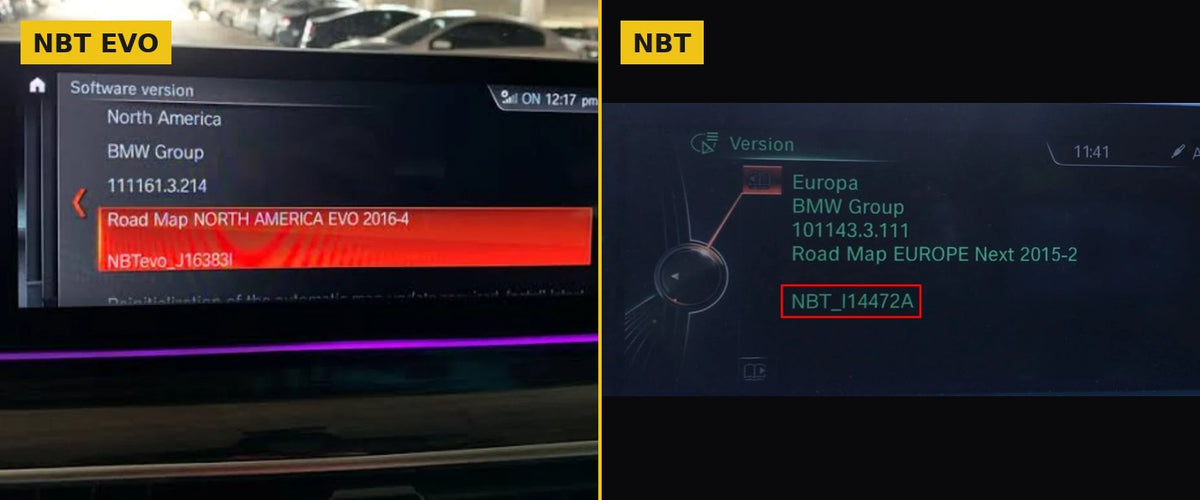
Go to Navigation → Options → Settings → Position & Version History → Version. A code starting with NBTEvo_ means NBT EVO, WAY_ means EntryNav2, and NBT_ means original NBT. Here's how to read it.
The three compared
| Activation | MMI box | Head unit | |
|---|---|---|---|
| Works on | NBT EVO, EntryNav2, MGU | Older systems, depending on the kit | Listed chassis, including CCC, CIC and NBT |
| What changes | Software only | Module and wiring added | Screen replaced |
| Screen | Factory | Factory | New 8.8 or 10.25 inch touchscreen |
| Install | USB or remote session | Trim off, behind the head unit | Direct fit, around 30 minutes |
| Sound | Factory | Often through AUX or Bluetooth | Factory amp and speakers |
| Our price (AUD) | From $99.99 | We don't sell these | $549 |
Activation depends on your head unit, software and WiFi hardware. MMI box features vary by brand. Head unit fitment depends on your chassis.
Quick way to choose
- NBT EVO, EntryNav2 or iDrive 7: go with activation. Nothing changes inside the car, so a box or screen adds cost and complexity you don't need.
- NBT EVO on iDrive 4: the iDrive 6 upgrade is usually the cleanest route, where your model's covered.
- Original NBT, wanting genuine BMW: an OEM NBT EVO swap.
- CCC, CIC or NBT, wanting a bigger screen: a CarPlay head unit.
- CIC or NBT, keeping the factory screen: that's where an MMI box fits.

Leave a comment
This site is protected by hCaptcha and the hCaptcha Privacy Policy and Terms of Service apply.