
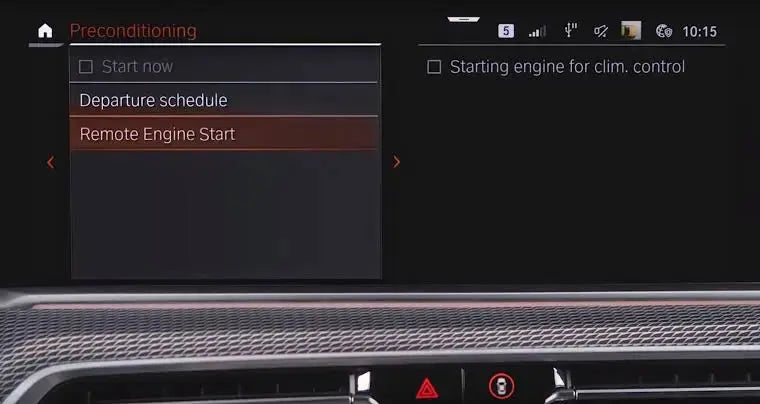
Walking out to a BMW that's already cool on a 40 degree day, or warm on a frosty morning, is one of those small things that makes a big difference. Plenty of BMWs have the hardware for factory remote start. It just isn't switched on.
Here's which BMWs can get remote start, how it works, and what the activation involves.
What BMW remote start does
Remote start lets you start the engine without being in the car, so the climate control can cool or warm the cabin before you get in.
- From your factory key fob, on eligible cars
- From the My BMW app, on supported vehicles and regions
- Cabin pre conditioning, so the car is comfortable when you get in
It's the genuine BMW feature, not an aftermarket kit. Nothing is added or wired in.
Which BMWs can get remote start?
Remote start can be activated on selected petrol BMW G Series and M models, including:
G Series
- 2 Series G42
- 3 Series G20 and G21
- 4 Series G22, G23 and G26
- 5 Series G30 LCI
- Other supported petrol G Series models
M models
- M2 G87
- M3 G80 and G81
- M4 G82 and G83
- M5 F90 LCI
- M8 F91, F92 and F93
- X3 M F97 LCI and X4 M F98 LCI
Compatibility depends on production date, transmission, engine software and installed hardware, so every car is checked by VIN before you buy. Manual cars need to be confirmed individually.
Toyota GR Supra
The Supra shares a lot of its electronics with BMW, so remote start can be activated on the Toyota GR Supra A90 too, from the key fob or the Toyota app. Automatic only.
Key fob vs My BMW app
Key fob remote start works on its own once activated.
Starting the car from the My BMW app depends on your car's region and ConnectedDrive services. If app remote start isn't available for your car, the key fob still works.
How the activation works
Our BMW remote start activation is done remotely, usually in about 15 minutes. No workshop, no module, no wiring.
- Compatibility check. We check your VIN and software setup before anything else.
- Connect your car. Plug an ENET cable into the OBD port and your laptop.
- Activation. Our technician completes the activation and coding live.
- Testing. We test it with you and show you how to use it.
You need an ENET cable, a Windows laptop or compatible Mac, stable internet, and access to the car during the session. An ECU unlock generally isn't needed, though some software setups need extra steps.
Using remote start responsibly
Use remote start in your driveway or on private property. Road rules generally require the engine to be off when you leave a car parked on the street.
Pair it with other G Series upgrades
Getting your car coded anyway? M car owners often add M Drive Professional in the same session. See everything in our BMW coding range.
FAQ
Can you add remote start to a BMW?
Yes, on many petrol G Series and M models it can be activated in software, using the factory key fob and, on supported cars and regions, the My BMW app. No extra module or wiring is needed.
Which BMWs can get remote start?
Selected petrol models including the G42 2 Series, G20 and G21 3 Series, G22, G23 and G26 4 Series, G30 5 Series LCI, M2 G87, M3 G80 and G81, M4 G82 and G83, M5 F90 LCI, M8 F9X, and X3 M and X4 M LCI. Compatibility is confirmed by VIN before you buy.
Does BMW remote start work on manual cars?
Manual cars need to be confirmed individually. Send your VIN and we'll check before you buy.
Can I start my BMW from the My BMW app?
On supported vehicles and regions, yes. App remote start depends on your car's region and ConnectedDrive services, while key fob remote start works independently.
Do I need an aftermarket remote start module?
No. On eligible cars this is the factory BMW remote start feature, switched on in software. Nothing is added or wired in.
Check if your BMW can get remote start
Send your VIN, model and year to support@bimmerdrive.com and we'll confirm compatibility before you buy.


Leave a comment
This site is protected by hCaptcha and the hCaptcha Privacy Policy and Terms of Service apply.