

Why Can't I Get CarPlay on My BMW With NBT?
Original NBT doesn't have native CarPlay, so there's nothing to switch on. It's a hardware limit, not something coding can fix. You can still get CarPlay in your car, just not through software alone.
Why NBT can't be activated
NBT and NBT EVO sound similar, but they're different head units. Activation works on NBT EVO because CarPlay is built into it. Original NBT can't simply be coded up to NBT EVO or iDrive 6. See NBT vs NBT EVO for the full comparison.
Are you sure you have NBT?
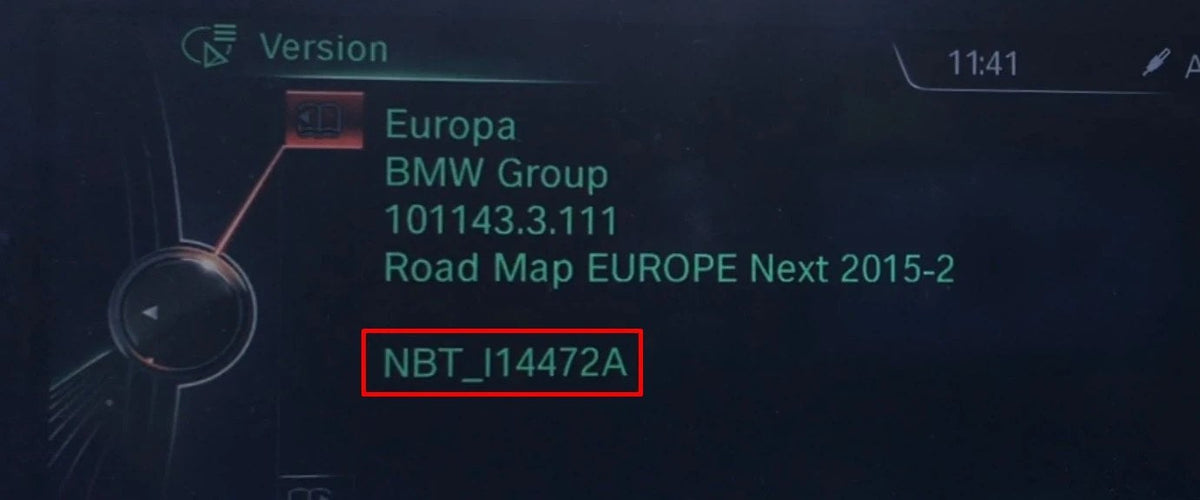
Check this first. NBT EVO on iDrive 4 uses the same older style menu as NBT, so it's easy to mix them up, and it can be upgraded in software. Go to Navigation → Options → Settings → Position & Version History → Version. A code starting with NBT_, like the one in the photo above, means original NBT. If it starts with NBTEvo_, you have NBT EVO. Here's how to check properly.
Your options
| Option | What it is | From (AUD) |
|---|---|---|
| CarPlay head unit | A touchscreen made for your chassis. Wireless CarPlay and Android Auto, plug and play, about 30 minutes to fit. Keeps your factory controls, speakers, microphone and reverse camera. | $549 |
| OEM NBT EVO head unit | Replaces NBT with a genuine BMW NBT EVO running iDrive 6 and fullscreen CarPlay. Some cars also need a compatible display, APIX cable or WiFi antenna. | $1,299 |
| Retrofit module (MMI box) | A box fitted behind the head unit that keeps your factory screen. We don't sell these, but it's another route to look at. | Varies |
The head unit is the simpler and cheaper of our two options. The NBT EVO swap makes sense if you want to keep a genuine BMW interface. Send us your VIN first and we'll confirm what suits your car. In Melbourne, we can install a head unit for you.
This guide is part of our main guide on adding Apple CarPlay to your BMW.


Leave a comment
This site is protected by hCaptcha and the hCaptcha Privacy Policy and Terms of Service apply.