
Home / BMW CarPlay Guides / Which iDrive do I have?

CCC, CIC, NBT or NBT EVO: How to Tell Which iDrive You Have
BMW's names for its iDrive systems are confusing, and they matter because they decide what you can add to the car. Here's how to work out which one you've got.
Quick guide
| System | Usually found | Clues |
|---|---|---|
| CCC | Mostly around 2003 to 2009, like early E60 and E90 | Oldest menu, with climate, communication and entertainment options |
| CIC | Mostly around 2008 to 2015 | No touchpad on the iDrive controller |
| NBT | Mostly around 2012 to 2016 | Older style main menu with Multimedia, and a code starting NBT_ |
| NBT EVO | Mostly around 2016 to 2019, some earlier | Code starting NBTEvo_. Can run iDrive 4, 5 or 6 |
| MGU | Many G Series from around 2019 | iDrive 7 |
Years are a rough guide, because production dates vary by country and some overlap. Don't rely on the year alone.
How to check properly
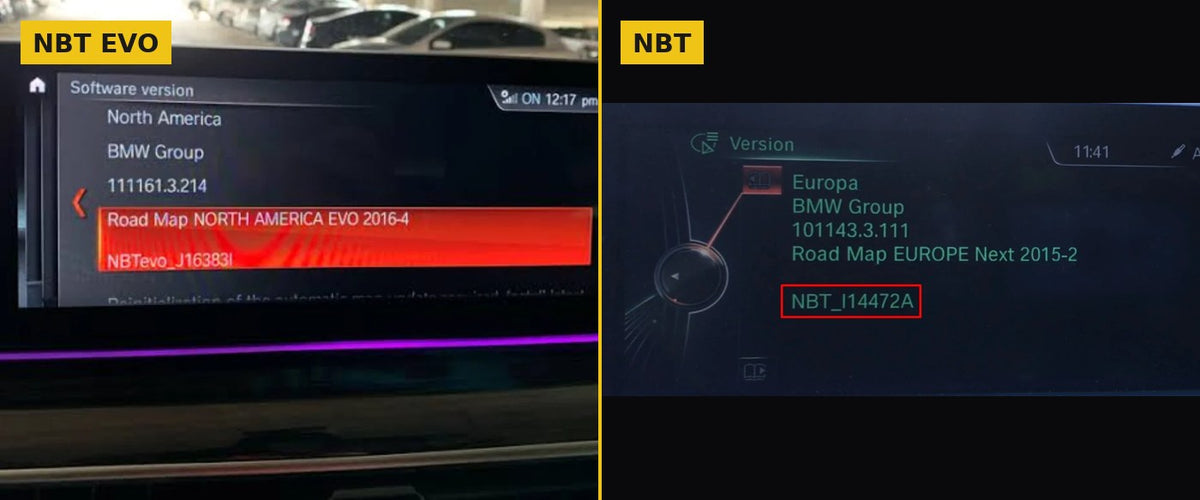
- On the iDrive, go to Navigation → Options → Settings → Position & Version History → Version.
- Read the code. NBTEvo_ means NBT EVO, NBT_ means original NBT and WAY_ means EntryNav2.
- If you can't find that screen, check the controller. CCC and CIC are the older ones, and an iDrive with no touchpad points to CIC.
- Stuck? Send us your VIN and a photo of your screen.
Our guide on checking for NBT EVO explains the codes in more detail, and why the menu alone can fool you.
What it means for CarPlay
- CCC and CIC: no native CarPlay. A CarPlay head unit is the usual route, where one's listed for your car.
- NBT: no native CarPlay. Use a head unit or an OEM NBT EVO swap.
- NBT EVO on iDrive 4: needs the iDrive 6 upgrade.
- NBT EVO on iDrive 5 or 6: activation from $99.99 AUD.
- EntryNav2: activation may work, depending on WiFi hardware.
- MGU: activation with Android Auto.


Leave a comment
This site is protected by hCaptcha and the hCaptcha Privacy Policy and Terms of Service apply.